Home | Altura Blog |
Ensuring your Onboarding is a Success
March 25, 2022 | Altura Blog
Bridge allows you to bundle learning together and send it out to staff quickly. However, this is a manual process. What happens when someone forgets to send it? Wouldn’t it be great to automate this process?
In this issue, we’ll show you how to allocate new starter programs to staff without fail.
Getting Started:
- Log onto Bridge and ensure you have Account Administrator rights.
- In the Author Module, create a new Orientation Program.
- Go the Administrator Module→Users & Permissions→Manage Groups
- Create a new Smart Group.
- In your smart group, add a rule for hire date, and select an appropriate date range (see image below).

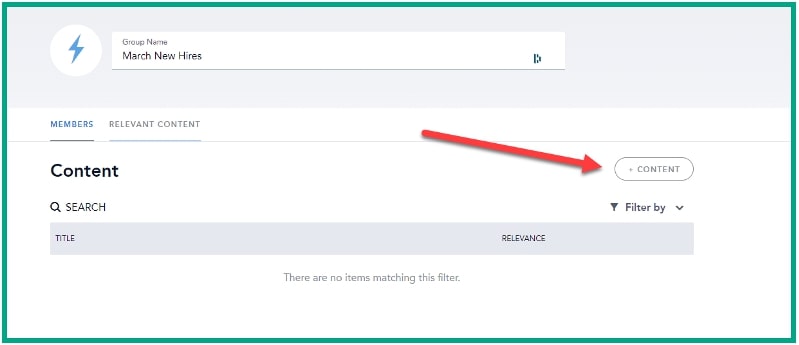
- Next, we link the new smart group with the program. In order to do this, please click on the relevant content tab (see image above).
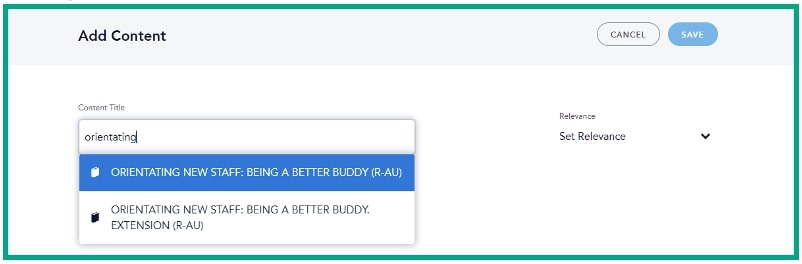
- Click on the content button and type in your program name (see image above)
- The matching content will appear in the window. Left-click to select the program (See image below).
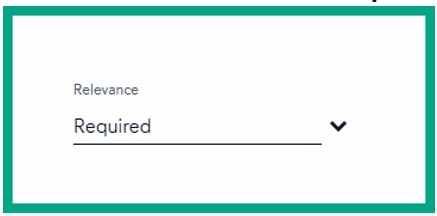
- Select the relevance. Click on required (see image below)

- Click on the save button.
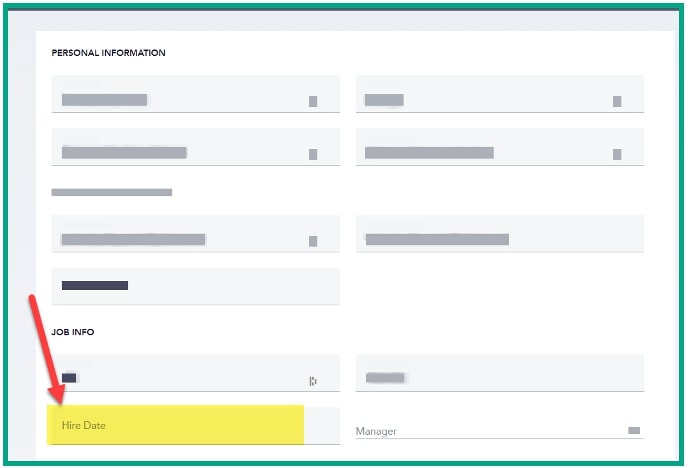
- When adding new staff, include the Hire Date (see image below). If the date is within the range specified in your smart group, then the learner will be enrolled in the orientation program.
Summary:
Using Hire Date ranges in a smart group is a simple and easy way to ensure that staff get their training as soon as possible. New starters must complete this program, so a best practice is to set up an automated weekly report in Analytics to help you monitor learner progress. When someone is overdue, you can use Bridge to reach out to and ensure they catch up.
That’s all for now. We hope you find this useful.